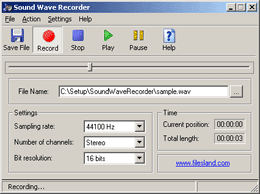
Wave Sound RecorderThis is a basic sound recording software. With the help of this utility you may record sound input from your microphone and save it as a WAV file. The software has options and features pretty much that of a tape recorder. You may start, stop, play or pause recording and save it as a file. Several output formatting options are available: sampling rate from 44100 to 8000 Hertz, mono or stereo and bit resolution. Volume controls are easily accessible from the settings dialog. Current playing position and total recording length are displayed as additional options. |
|
 |
Software Version:
1.31 Size: 474 KB Released: Nov 16th, 2012 Price: Freeware Operating Systems: Windows 7/8/8.1/10 
|
Wave Sound Recorder HelpPrior to recording the audio please make sure that the volume and microphone settings are set up correctly. You may access these from system "Settings" menu. It is particularly important that microphone is not muted and sensitivity level is high enough to record the sound. Press "Record" button to start recording and "Stop" to end it. Now the recorded file is stored in the software memory. You may play it or you may record another file. Previous recording in the second case will be overwritten. Once you are satisfied with the recording you may save it as a wav file. Make sure that the File Name contains the full path to a file where you would like to save the audio. Standard formatting options for WAV file allow you to change frequency level (from 44100Hz to 8000Hz), number of audio channels and bit rate. Note: the higher is the quality of the recording the larger the size of the recorded file will be. You can also view total recorder file length in seconds. This software is a freeware, you may use it free of charge for personal use. You are not allowed to collect money for distributing it or sell it. Please see license agreement for the details. |
|