Hash Calculator

Advanced Hash Calculator

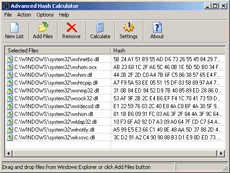
This hash calculation utility computes hash string for multiple files at once. Just drag and drop files at the main screen of this software and hash strings for files will be calculated and displayed on the fly. Hashing algorithms supported are hashing algorithms CRC32, GOSThash, MD2, MD4,.MD5, SHA-1, SHA2-256, SHA2-384, SHA2-512. You may copy strings one by one or export the full list of hashes from the software with one click. Great tool for network administrators and webmasters to calculate file control sums.

Price: $19.95
Version: 2.34 Released: March 1st, 2008

Size: 539 KB
Platforms: Win95,Win98,WinME, Windows2000, Windows XP, VISTA (all)

Download at Filesland  


Order Advanced Hash Calculator Now!
 
Online Software Help

 
How to use Advanced Hash Calculator

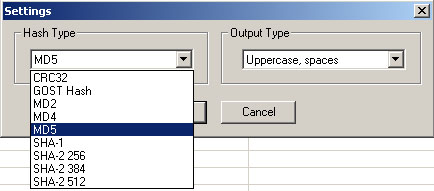
1) Click on the "Settings" icon or select "Options" -> "Settings" from the top menu.
 
Settings selection dialog will show up. Select one of the hashing algorithms CRC32, GOST hash, MD2, MD4,.MD5, SHA-1, SHA2 (256), SHA2 (384), SHA2 (512) and the desired hash output view.

2) Drag and drop files from Windows Explorer into the list area of the program. Alternatively use "Open File" button to select files that you would like to calculate hash for. "Hash" column will automatically updated with a calculated hash for the file data. Fro large files data calculation may take a few seconds. To remove files from the list you may highlight files and click "Delete" button on your keyboard.

3) Right-click on a file in the list, select "Copy Hash to the Clipboard". Hash string will be copied to the clipboard.

4) Would you like to save all the computed.  hash strings? Use "Action"->"Export Hash" option. A file with all files names and corresponding hashes will be opened in notepad.

5) If the files have been modified since the last hash calculation you may always recalculate hash strings by clicking on "Calculate" button on the toolbar.


Copyright © 2003-2008 FilesLand.com