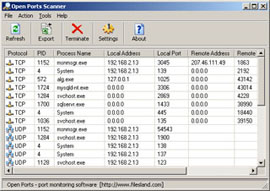
Open Ports ScannerThis software monitors TCP and UDP open network ports and connections on your computer. It displays open port information, type of the connection, process ID and process name, local and remote port numbers, remote connection IP and state. This utility may help you to detect trojans and malicious software. You may close unwanted TCP connection right from this application or export the list of the connection for further research. Monitoring features include TCP/UDP and IPv4/IPv6 display filter and desplay refresh timer control. |
|||||
 |
Software Version: 2.60.2 Size: 3.00 MB Released: September 27th, 2026 Price: $19.95 Operating Systems: WinXP/Vista/7/8/8.1/10/11   |
||||
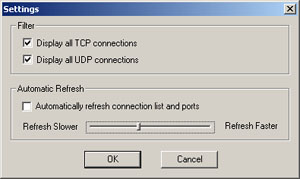
Open Ports Scanner HelpOpen Ports Scanner is an enhanced netstat utility. For those of you who are familiar with network command line tools in Windows, netstat.exe should be a well known tool. This software extends functionality of this useful Windows networking tool. It brings you graphical user interface, an ability to monitor open ports over time, selectively display only TCP or UDP connections. Additionally it maps open ports to the running processes and even allows terminating an open TCP connection right from the program. Note that the underlying process is not terminated or "killed", you may just close TCP connection: right click on an open port that you would like to close and select "Close Connection". The software fully supports IPv4 and IPv6 protocols Below is a screenshot of program settings. It allows you to control the refresh speed of the scanning timer and apply a filter, depending on open ports of what type or protocol you would like to display.
|
|||||